Seite 1 von 1
Honeywell
Verfasst: 24 Apr 2007 23:28
von dennisjames1
Hi Werner
I notice when i set my user location in WsWin it works fine but the longitude setting shows two digits instead of three, e.g if you set 151'58" E, in the programme it will show 51"58"
cheers
Dennis
Verfasst: 25 Apr 2007 06:36
von Werner
@Dennis,
under Weather station, Adjustments
or where ?
Werner
Verfasst: 28 Apr 2007 03:09
von dennisjames1
yes under Weather Station adjustments and console
Verfasst: 28 Apr 2007 12:25
von Werner
@Dennis,
where exact?
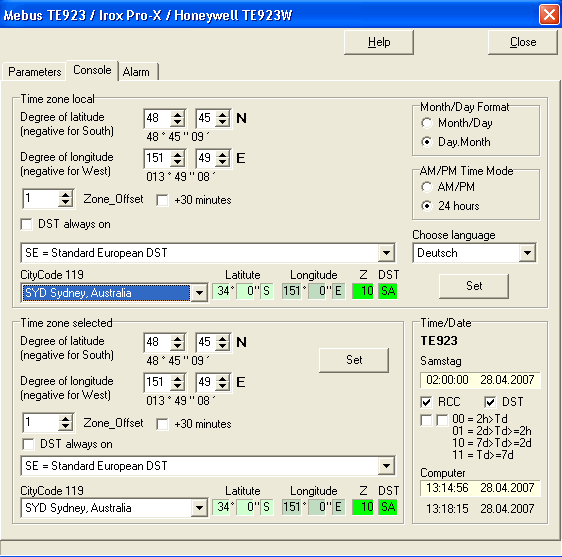
Werner
Verfasst: 28 Apr 2007 22:59
von dennisjames1
Hi Werner, that is the screen , it happens when you input details under user defined, shows only 2digits in longitude instead of three in those green boxes when you save it.
Info under where you enter the co-ordinates is correct though, the preset cities work fine ,showing the correct longitude with three digits as in the Sydney example in those boxes.
It seemed strange that it didn't save the data that way, it all works well, i just thought i would mention it to you.
I have a difference in my rainfall reading, for example the station shows 9.1mm and on WSWin in reads 8.9mm, is there a calibration adjustment i need to carry out ?
cheers
Dennis
Verfasst: 29 Apr 2007 21:15
von Werner
@Dennis,
there is now a V2.93.13a available which corrects this degree problem.
Rain: It seems that the manufacturer of this station has changed the value of each tip.
Formerly is was 0.6866
With your reported values 0.700
Best will be to check/calibrate your rain sensor and with the result use a modified calibration factor.
Werner
Verfasst: 30 Apr 2007 00:11
von dennisjames1
Thank-You Werner for your help again, is the new version available for download from the registered users site now or when rhe next update is scheduled.
Cheers
Dennis
Verfasst: 30 Apr 2007 07:39
von Werner
@Dennis
update: use/download the single file wswin32_29313a.exe (or wswin32ns_29313a.exe) from the \user\prg folder,
store this file in the WsWin installation folder and rename it
to Wswin32.exe.
Werner